All workEsc

I built Hanji to
review and direct
agent work.

AI agents were writing documents and carrying out more of my tasks. I needed clearer ways to read their output, judge it and decide what happened next.
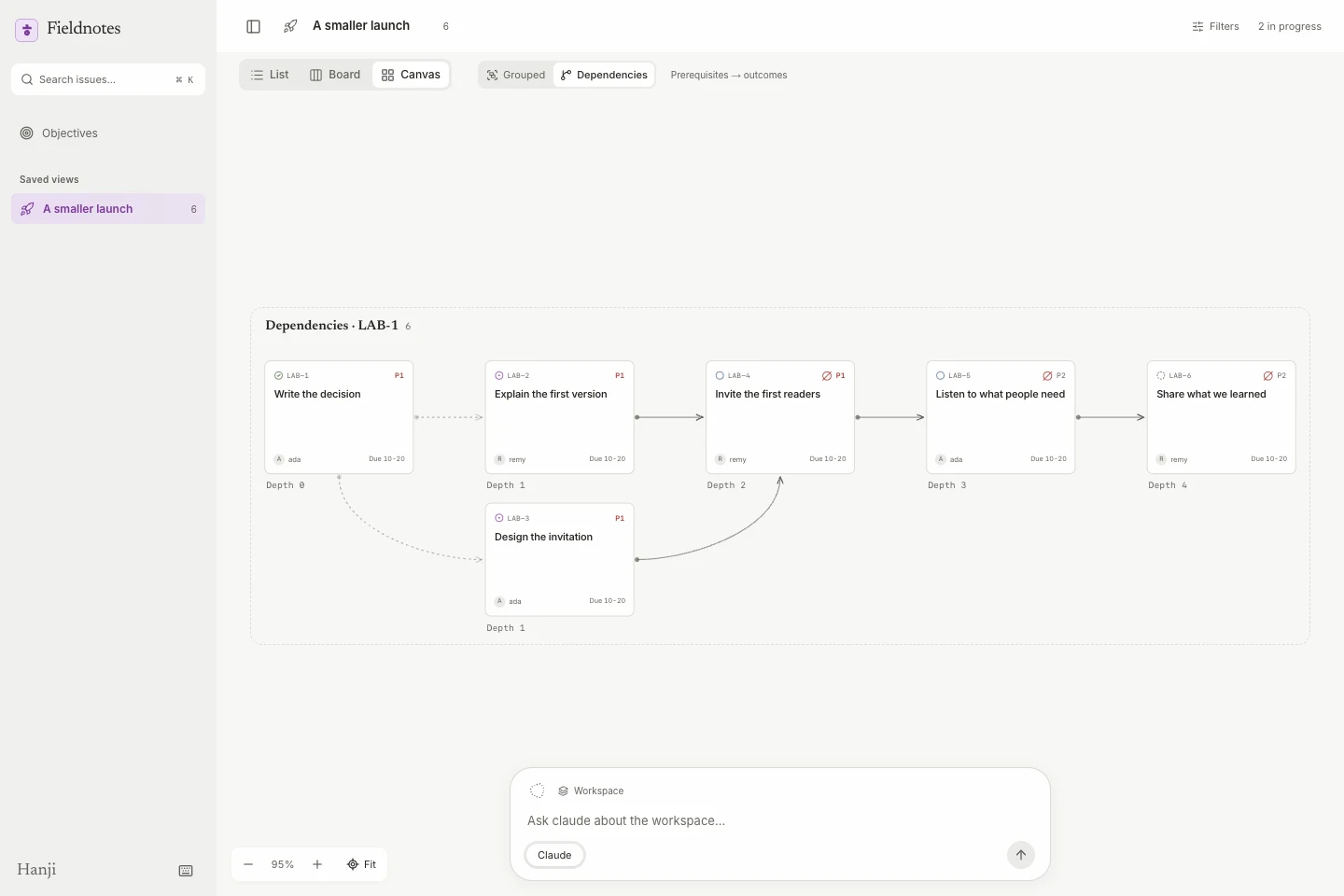
Hanji Work in a local alpha build: fictional issues arranged in a dependency canvas, with an agent composer below.

Write made agent documentsreadable and reviewable.

Agent-created documents were easy for agents to use. I needed people to read, question and revise them together. Write became a shared surface for the words, the discussion and the decision to accept a change.

Write · Private test · Request access
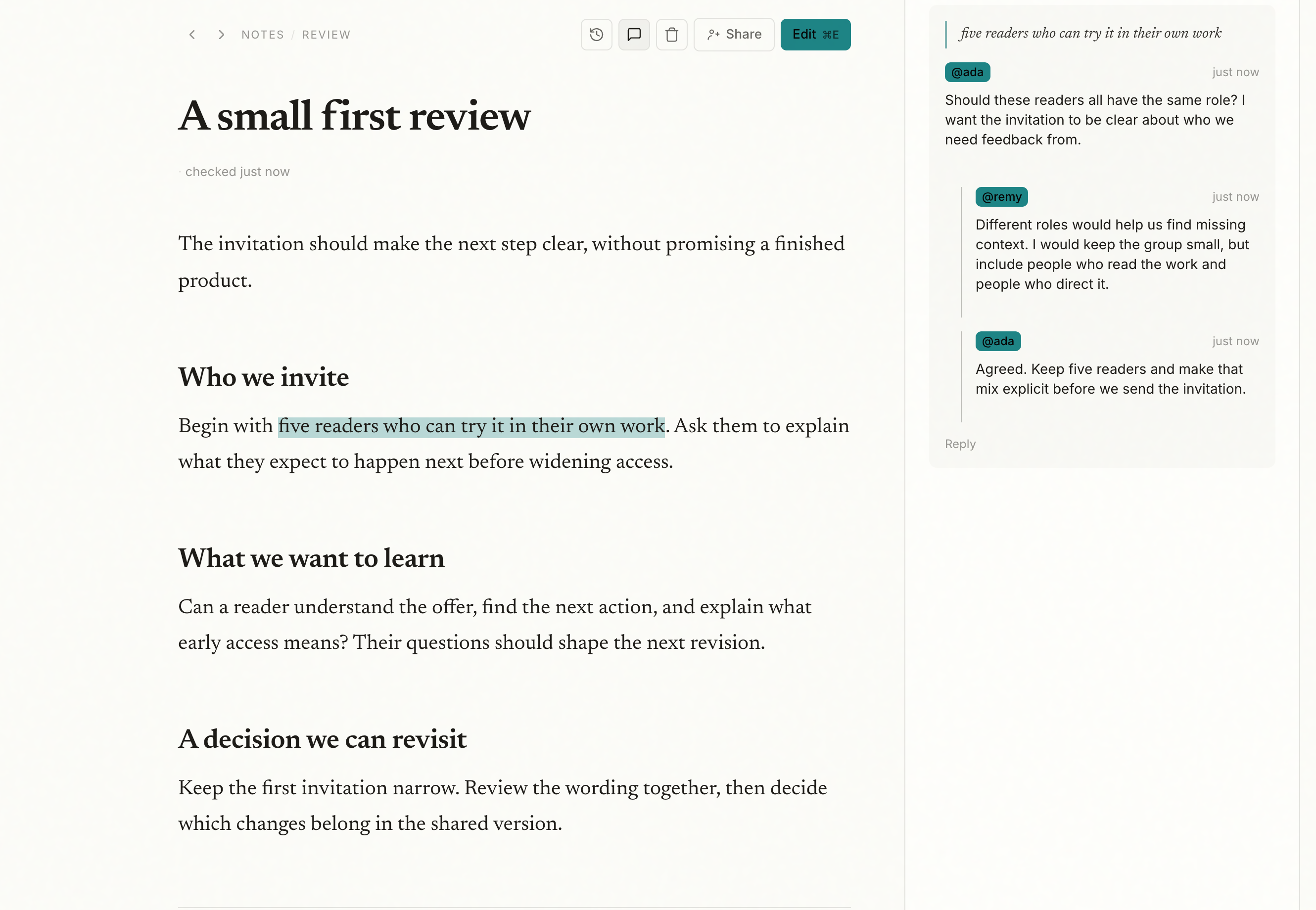
Write document with a highlighted passage and an anchored discussion between two reviewers
Write: reviewing a document together. Demo content.
Zoom in · Reviewing concurrent edits

People and agents could change the same document. How could I keep my draft and still judge an agent’s proposal?

People decide
which changes belong.

I kept the proposed edit beside its author and controls to reject or accept it. Human discussion stays attached to the passage being judged.

When an agent changed a document I was editing, preserving my draft became the priority. Independent edits can merge; overlapping changes need a choice.

Reviewing an agent’s proposed edit. Demo content.

Work let agents executewhile I judged the plan.

Readable documents were only the start. I needed to see how the work connected. In Work, agents create issues, organize views and carry out tasks. I inspect the whole picture and direct them at workspace or issue level.

Work · Early build · Request access
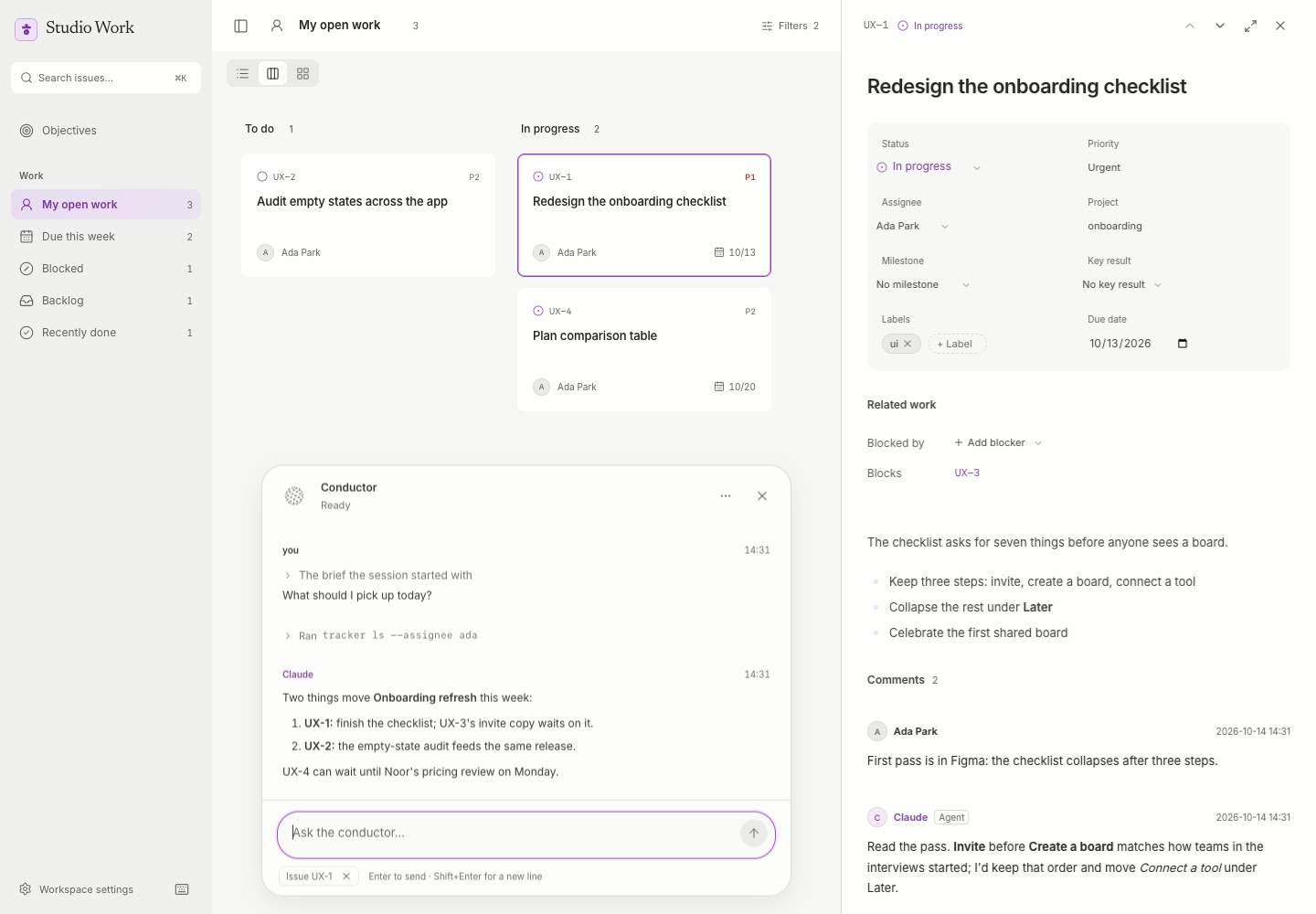
Work local preview with a workspace conductor at lower left and an issue discussion open on the right
Work: the overall plan and the task conversation, together. Demo content.
Zoom in · Directing an agent on an issue

Instructions in a separate conversation lost the context of the task. Where should the conversation live?

Commands moved
into issue comments.

I tried terminals, then a separate in-app conversation. Bringing the AI assistants Claude and GPT into the task’s comment thread kept the instruction, response and next decision beside the work.

Organizing a task should not silently trigger an agent. I replaced label-driven requests with explicit commands.
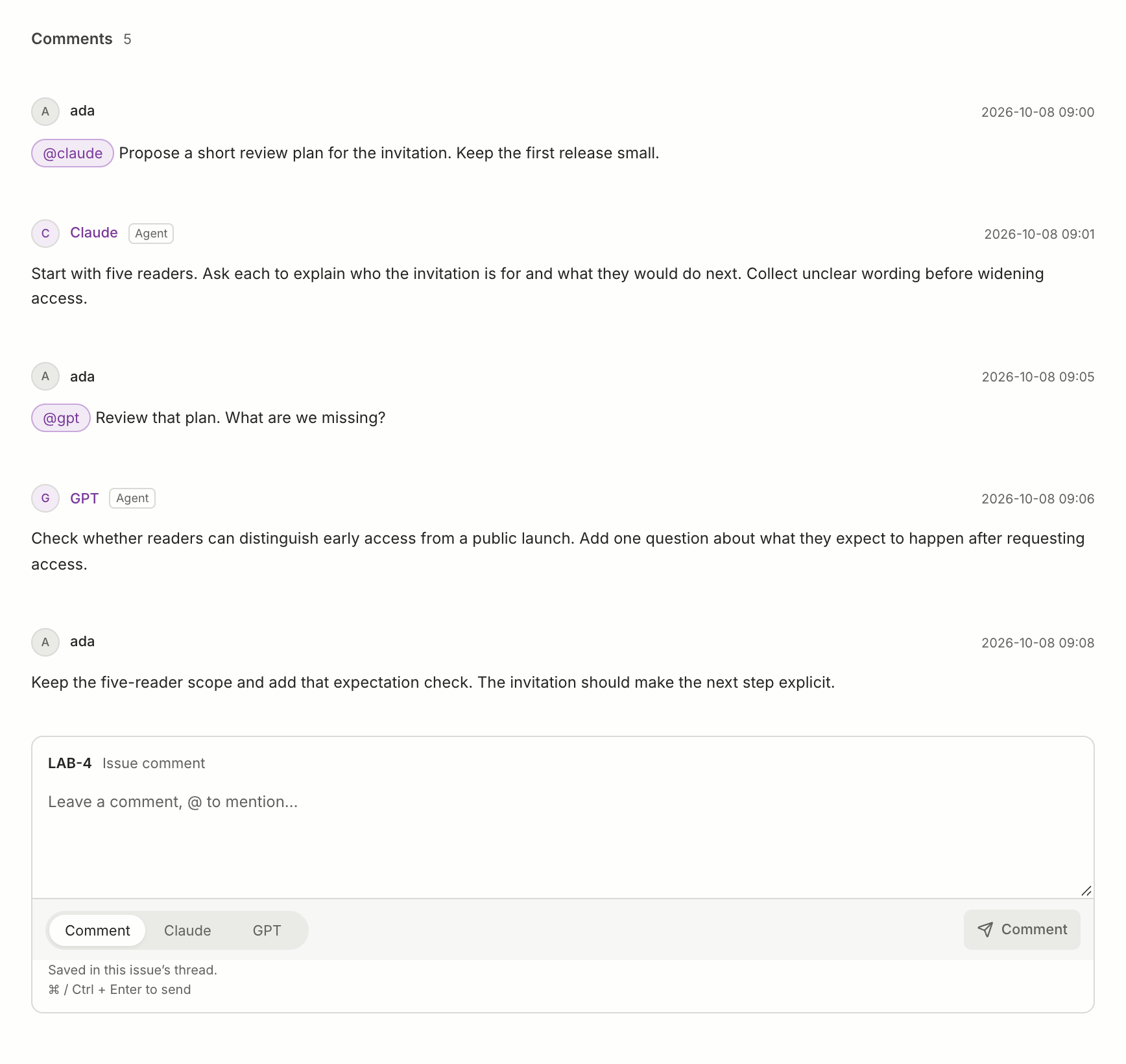
Work issue thread with attributed Claude and GPT answers, human direction, and agent recipient controls
Claude and GPT in the task thread. Staged conversation in the working interface.

Think connects sketchesto documents and tasks.

My early thinking still lived in Figma and FigJam. In my setup, FigJam’s agent connection did not give me the control I needed, and moving ideas into product management meant plugins and workarounds. I started Think to connect that stage to Write and Work.

Think is a local prototype.
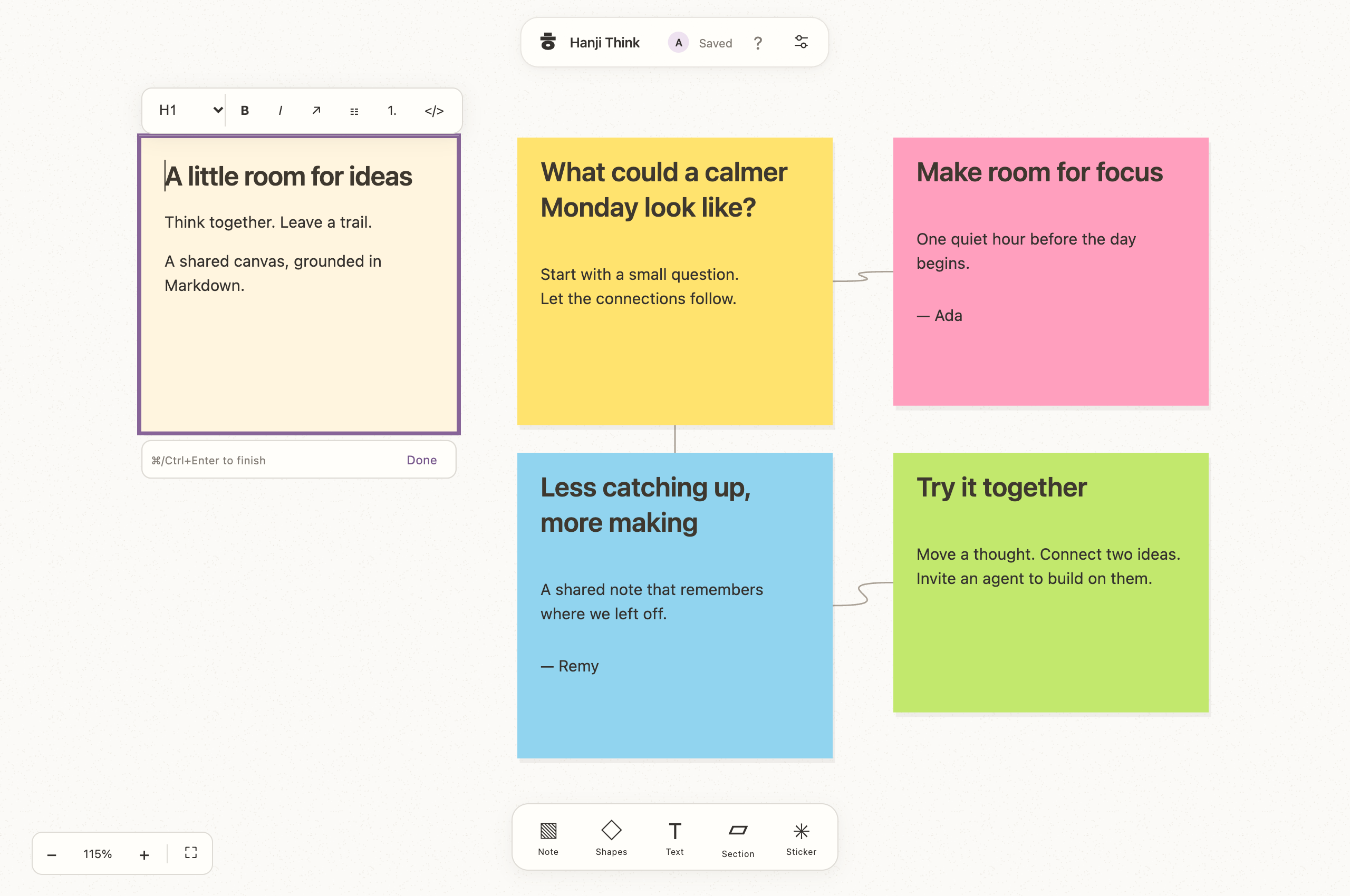
Think local prototype with connected fictional notes and a note being edited inline
Think: an early canvas prototype with sample notes.

Carry the idea into execution
without losing its source.

Choose a connection to follow
ThinkFirst visit / Questions
What does someone need to know first?
A question to work on

What should a first visit explain?

Linked issue · To do
WorkIssue
To do

What should a first visit explain?

Explore the first visit. Decide what a new person needs before taking the next step.

From ThinkFirst visit / QuestionsSource sticky retained

The sticky stays on the board with a live issue link, while a short Undo window can cancel a newly created issue.

ThinkFirst visit / Questions
Selected section

What should a first visit explain?

Start with what matters.Show one useful next step.
WriteReview the destination & content
Page preview

What should a first visit explain?

Start with what matters.
Show one useful next step.

From ThinkFirst visit / QuestionsBoard and section linked

Preview the content and destination before creating a page or submitting it for review.

WriteFirst visit / A useful beginning
A useful beginning

What should a first visit explain?

Begin with what matters.

Give a new person one useful next step before introducing the rest.

Selected passage
WorkIssue
To do

Design one useful next step.

Give a new person one useful next step before introducing the rest.
From WriteFirst visitHeading: A useful beginning

The new issue carries the selected words, page and heading, keeping the reason for the task beside the action.

Interaction study · Illustrated from local implementations.

These connections are implemented locally and still being tested together.

Daily use shapeda calmer, faster interface.

I use Write and Work at Buzzvil every day. That made small frictions hard to ignore: unreadable color, a lost cursor, an unnecessary wait. The visual system and the interaction details grew together.

ㅎ → Hanji
A surface for shared thought

Hanji

ThinkWrite Work
Brand specimen · The existing mark and reading type, with Write’s celadon and Work’s orchid accents. A shared identity, with room for different kinds of work.
Write and Work, one visual family
Three starting colors
accentbackgroundtext
Light + dark, derived together
lightWrite
Paper / workspace
Sheet / content

Color gives
attention a place.

Keep the shared context visible.

Bring a decision into focus.

Highlight · 30%Focused · 55%
Accent textAction
Inset / supporting contextColor changes. Hierarchy stays.
darkWrite
Paper / workspace
Sheet / content

Color gives
attention a place.

Keep the shared context visible.

Bring a decision into focus.

Highlight · 30%Focused · 55%
Accent textAction
Inset / supporting contextColor changes. Hierarchy stays.
Inspect the color roles
RoleLightDark
Paper#fcfcf8oklch(23.50% 0.0060 106.5)
Sheetoklch(99.80% 0.0053 106.5)oklch(25.70% 0.0060 106.5)
Insetoklch(97.80% 0.0053 106.5)oklch(21.90% 0.0060 106.5)
Text#1e1c18oklch(93.00% 0.0081 84.6)
Accent fill#1e8485#1e8485
Accent textoklch(54.94% 0.0878 195.9)oklch(60.94% 0.0878 195.9)
Label on accentoklch(12.00% 0.0000 89.9)oklch(12.00% 0.0000 89.9)
Product colors
accentbackgroundtext
Light + dark, tuned by role
lightWork
Paper / workspace
Sheet / content

Color gives
attention a place.

CAgent contribution10% tint
ClaudeGPTRecipient · 9%
Direct the next step Focus border · 45%
Accent textAction
Inset / supporting contextColor changes. Hierarchy stays.
darkWork
Paper / workspace
Sheet / content

Color gives
attention a place.

CAgent contribution10% tint
ClaudeGPTRecipient · 9%
Direct the next step Focus border · 45%
Accent textAction
Inset / supporting contextColor changes. Hierarchy stays.
Inspect the color roles
RoleLightDark
Paper#f7f7f5#1b1c1b
Sheet#fefefd#232423
Inset#eaeae7#2b2d2a
Text#242522#eeefea
Accent fill#8d43b8#ce91f2
Accent text#793899#dda7fa
Label on accent#ffffff#251b2b
Write’s celadon uses its theme generator; Work’s orchid uses its curated sRGB light and dark palettes. Surface layers and interaction tints use current product tokens. Write’s highlights mix the accent with transparency in OKLCH; Work’s tints mix it with the sheet in sRGB. These are design specimens, not screenshots.

Write builds its light and dark color schemes from three starting colors. Work uses carefully selected purple palettes. I tested both in the interface: text, transparent highlights, focus and action.

Zoom in · Repeated actions

Daily use made small interruptions add up. Moving between reading, editing and directing needed to stay quick.

Repeated actions
need fewer interruptions.

I kept reading-to-editing inside the same page and prepared the editor on hover or focus. Opening another Work issue preserves the board underneath.

Shortcuts grew from the actions I repeated. They stay out of the way when someone is typing.

Find an issue
⌘ / Ctrl K
Reach its comment
c
Send an instruction
⌘ / Ctrl Enter
Formatting as you type in Write.

What I learned:judgment needs context.

A document, an issue and a sketch each make something easier to see. The important design work was keeping the reasoning intact as it moved between them and keeping people oriented while agents changed the work.

Daily use gives me a close feedback loop. The next step is to extend it to roughly five to ten people, and learn which decisions hold up outside my own workflow.

Write is being tested privately with a small group. Work is an early build, and Think remains a local prototype. Open source is a direction; there has been no public source release.

Image detail

Loading full-size image…